How to convert Flash to HTML5?
With Sothink SWF Decompiler, you are able to convert Flash into HTML5 for use. In this tutorial, we will illustrate the detailed steps for you. Your attention is greatly invited!
Sothink SWF Quicker
Provide a much Quicker way to build your own flash animation, powerful but easy-to-use.
Step 1
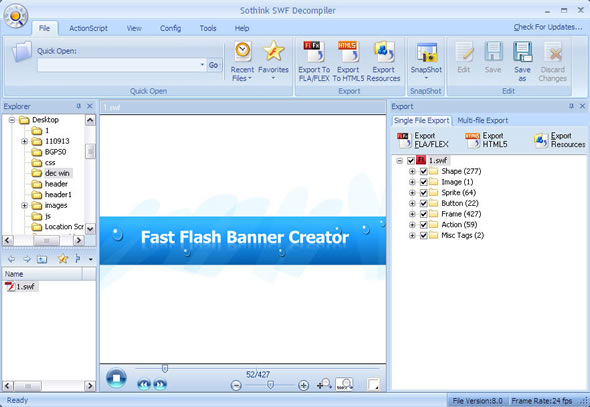
Load the relevant SWF into Sothink SWF Decompiler for preview.
Step 2
Click on Export HTML5 button to launch the relevant export wizard window.
.jpg)
You can click on Browse button to define the output directory for new .html file.
Convert Flash to HTML5 files
A high-performance Flash decompiler for you to convert SWF to FLA or FLEX precisely; Easily extract all Flash resources; Convert Flash to html5 files; Replace image/shape/text/sound for SWF. It is the first decompiler to get XFL from Flash CS5 SWF.
Step 3
Click on OK button to start the conversion process.
.jpg)
Step 4
After the exporting process has been finished, please go to the directory you specified to preview .html file.
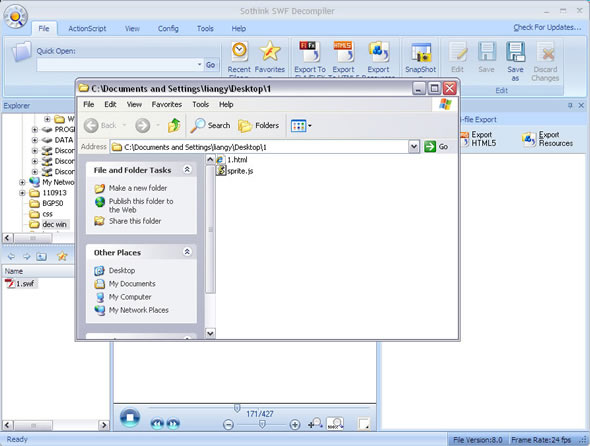
Let's preview the exported .html in browser now.
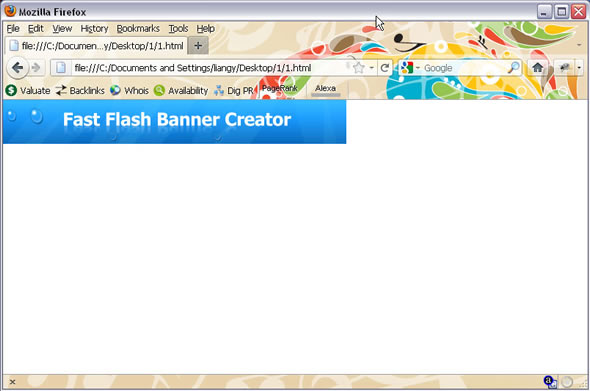
Now the whole converting process is over, it is very simple to convert Flash into HTML5 with the latest version of Sothink SWF Decompiler!
Hope this tutorial helps.
Quick Start Guide

Sothink SWF Decompiler

- Easily convert SWF to Flash document (*.fla)
- Extract almost all SWF elements for reuse
- Edit shape or replace image/ text/ sound for SWF
- Play rash movies in HTML5 compatible browsers.
- Dedicated to SWF decompile for over 10 years.
- Better accuracy and performance in Flash SWF decompile.
- Support Flash CS3/CS4/CS5/CS6 and ActionScript 2.0/3.0.