|
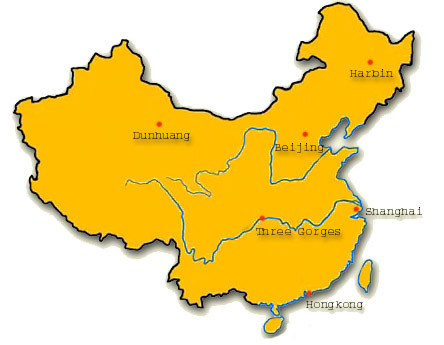
Create an image map by using DHTMLMenu. When mouse moves over the red dot, a description of it will display.
Introduction:
In this sample, Sothink DHTMLMenu combines with the China map. The menus and red dots identify the locations of several cities on China map. When mouse moves over the red dot, it will shows the information of corresponding city. These information include the city photo, city name, its population, its area, and its interesting places. It is more visual to understand each city' geographic location.
Steps:
- Set the hotspot of your image. (You can use the hotspot function of Dreamweaver to do it.)
- Add JavaScript function to your page. The function code is like following:
function hideFloatMenu(n)
{
var m=stmenu(n);
if(m) clearTimeout(m.hdid),m.hdid=setTimeout('hideMenu(\''+n+'\')',m.mhdd);
}
function showFloatMenuByEvent(e,n)
{
showFloatMenuAt(n,nNN4?e.pageX:e.clientX+stgcl(),nNN4?e.pageY+20:e.clientY+stgcl()+20)
}
- Add mouse over and mouse over event to image hot area like this:
<area shape="circle" coords="305,135,8" href="#"
onmouseover="showFloatMenuByEvent(event,'mBeijing')" onmouseout="hideFloatMenu('mBeijing')">
- Modify the file "stm31.js": change the stAHCM=0;into stAHCM=1;
Note:
e.clientX+stgcl() and e.clientY+stgcl() are for browsers as IE, Opera, FireFox, Safari, etc.
But if you use browser Netscape 4, you should change them into e.pageX and e.pageY .
|
|
