Working Area Guide -- Sothink SWF Decompiler
Single File Export
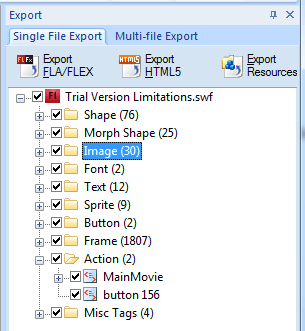
Export panel is on the right side of the main working area in Sothink SWF Decompiler. There are two tabs "Single File Export" and "Multi-file Export" here. Check the tab "Single File Export" to enter the panel, you will see the three options "Export FLA/FLEX", " Export HTML5" and "Export Resources", and below lists the all resources included in the selected Flash movie.
If the option "Browse .swf files without parsing" not checked, when you select a Flash file in the Explorer, Sothink SWF Decompiler will analyze it and show its resources here. You can click on  to expand the folder. When you want
to export an element, you should check the square box in front of it.
to expand the folder. When you want
to export an element, you should check the square box in front of it.


