Export Setting for Multi-file
Export FLA
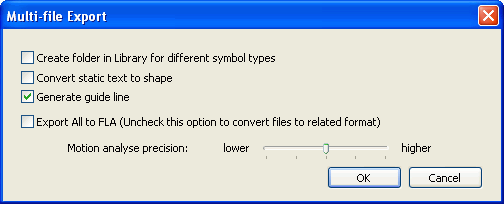
Create folder in library for different symbol types:
By choosing this, SWF Decompiler will save the symbols in different folder according their types.
Convert static text to shape:
By default, Decompiler will generate text instead of converting the static text to shape. But if the original font is lack on the user's computer, it will affect the text display. In order to make the text display look the same as the original movie, user can choose this option to change the text into shape.
Generate guide line:
This option enables user to choose generating guideline or not when converting the guideline movie to FLA format. By default, this option is checked and Decompiler will generate the guideline. But if there are some problems with the generated FLA, e.g. can not be opened in Flash, you can try unchecking this option and Decompiler will not generate the Guideline, which may avoid the problem.
Export All to FLA (Uncheck this option to convert files to related format)
Checking this option, export all the selected SWF files to FLA format.
Uncheck this option to convert files to related format: FLEX project or FLA.
Motion analyse precision:
Set the precision level used to recover motion tween.
Export Resources
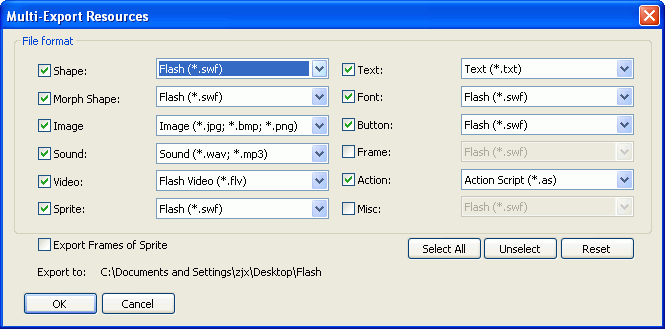
File format
- Shape file will be exported as *.fla, *.swf or *.gls.
- Morph Shape file will be exported as *.swf or *.fla file.
- Image file will be exported as *.jpg, *.bmp, *.swf or *.fla file.
- Sound file will be exported as *.mp3, *.wav, *.swf or *.fla file.
- Video file can be exported as Flash Video (*.flv), *.swf or *.fla file.
- Text file can be exported as *.txt, *.swf or *.fla file.
- Sprite file can be export as *.swf or *.fla file.
The frames included in sprite can be exported. - The exported file of font, button, frame, misc will be *.swf or *.fla file.
- Action file will be exported as *.as, *.html or *.bin format.
Select All: Choose all the resources to export.
Unselect: Choose none of resource to export.
Reset: Recover to the original default settings.
Export to
List the folder that you have chosen to save all these exported resource file.


