Working Area Guide
Sothink SWF Decompiler applies ribbon bar in interface layout. The users can use this program more conveniently.
Let's see the commands in each tab:
View
The commands in tab "View" enable to show or hide panels; check the movie information; refresh the folders or restore the bars to the default setting; and set the interface style.
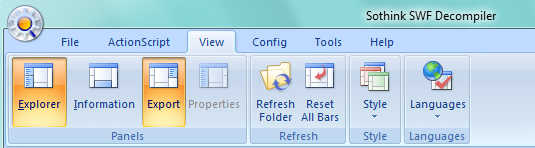
Panels
Explorer: Show or hide Explorer panel.
Information: Show or hide Information panel.
Export: Show or hide Export panel.
Properties: Show or hide the Properties window when the shape-editing panel opens.
Refresh
Refresh Folder: Reload current directory to check the latest file information within this folder.
Reset All Bars: Restore the panels to the default layout.
Style
Style: Choose the favorite interface style to meet your need.
- Office 2007 (Blue Style): Change current interface style to Office 2007 blue style.
- Office 2007 (Black Style): Change current interface style to Office 2007 black style.
- Office 2007 (Silver Style): Change current interface style to Office 2007 silver style.
- Office 2007 (Aqua Style): Change current interface style to Office 2007 aqua style.
Languages
Languages: Initially, the program will adopt the system language as the interface language. You can switch to other language by your choice.
- English: Display the program interface as English.
- 中文 (繁體): Display the program interface as Traditional Chinese.
- Deutsch: Display the program interface as German.
- Française: Display the program interface as French.
- Italiano: Display the program interface as Italian.
- 한국의: Display the program interface as Korean.


