
How to Install Sothink Flash Downloader For Firefox?
This Flash Downloader is a free Firefox extension which provides the smart function of online Flash save and Flash download. Easily save rich SWF format media from Firefox with great speed. One-click Flash download without copying & pasting URL.
Please Note: For the users who want to upgrade to the latest version of Flash Downloader For Firefox, to ensure the new version works correctly, please uninstall the old version at first before installing the latest version program.
Installation (For FireFox 4.x and above)
- Make sure you have got the setup file: swfcatcher.xpi
- Drag swfcatcher.xpi file to the opened Firefox browser.
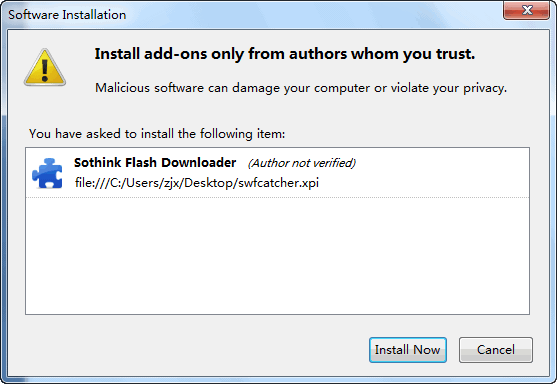
- The below window opens, click the Install Now button in the Software Installation window.
- Restart Firefox.
Installation (For FireFox 3.x and below)
- Make sure you have got the setup file: swfcatcher.xpi
- Open Firefox, find the top menu File (Alt+F) >> Open File (Ctrl+O) and click it.

- Browse to find swfcatcher.xpi and open it.
- Click the Install Now button in the Software Installation window.
- Restart Firefox.
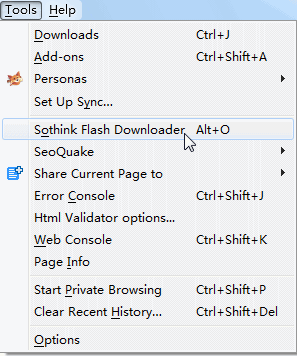
- You will see Sothink Flash Downloader (Alt+O) is under the top menu Tools.
- How to use it >>
Uninstall (For FireFox 4.x and above)
- Select Tools > Add-ons > Extensions.
- Select Sothink Flash Downloader from the extension list.
- Click Remove.
- Restart Firefox.
Uninstall (For FireFox 3.x and below)
- Select Tools > Add-ons > Extensions.
- Select Sothink Flash Downloader from the extension list.
- Click Uninstall.
- Restart Firefox.
-
About Sothink Flash Downloader For Firefox
-
It is a handy and useful Firefox plug-in for Flash save/Flash download from web. Get the Flash downloader and enjoy more intuitive interface; faster downloading speed; multi-language interface; support for Windows and Mac; compatibility with the latest version Firefox; one-click operation without copying & pasting URL… Feel different Flash download experience. No need to worry about losing interested online Flash anymore!
-
-

Related Products

- SWF to Video Converter
- Flash to Video Converter, Convert Flash to Video AVI!

- Video Encoder for Adobe Flash
- Convert Video to Flash (FLV and SWF)!

- SWF Quicker
- Leading Flash SWF editor to open and edit SWF directly!

- Logo Maker
- Help even novice to fast DIY unique logos!
Product Info
- File Size: 151 KB
- Latest version: 1.11
- Uninstall: Supported

