Working Area Guide
Sothink SWF Decompiler applies ribbon bar in interface layout. The users can use this program more conveniently.
Let's see the commands in each tab:
ActionScript
The commands in tab "ActionScript" enable to search the string and display multi-byte ActionScript code, even the users can set an advanced search to find the string quickly; moreover, the users can change ActionScript view to different representations.
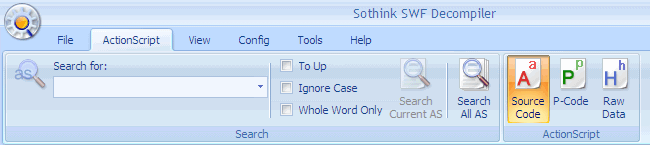
Search
Search for: Type the string and search it in ActionScript file; and also you can set the filter to make an advanced search, such as ignore case, whole word only.
- Search for: Input the vital string in the field to search in ActionScript code.
- To Up: Search for the string from the position where cursor is to top.
- Ignore Case: Ignore text case, which you specified in the field "Search for".
- Whole Word Only: Search whole words only for the text which you specified in the field "Search for".
Search Current AS: Start searching ActionScript within the current ActionScript file.
Search All AS: Start searching ActionScript in all ActionScript files of the selected Flash. After searching all AS, the results will be shown in "Search Results" tag of "Tag information" panel .
ActionScript
Source Code: Show ActionScript as source code.
P-Code: Show ActionScript as p-code.
Raw Data: Show ActionScript as raw data.
Note: To modify ActionScript display, switch to "Config" tab for more.


