Sothink-Flash Movie Maker, SWF Decompiler, DHTML Menu, SWF Quicker, SWF to FLA converter, SWF Editor, HTML Editor

Payment

Q1: What payment methods can I use to buy Sothink products?
Q2: What’s Element 5 and how to orders via Element 5 (ShareIt)?
Q3: What’s PayPal and how to order via PayPal?
Q4: What currencies do you accept?
Q5: How to use the coupon information in my order?


Q1: What payment methods can I use to buy Sothink products?
A1: We offer three terms of payment methods for the customers to order software either online or offline: pay via Element 5, PayPal. Element 5 is preferred.

Q2: What’s Element 5 and how to orders via Element 5 (ShareIt)?
A2: About Element 5(ShareIt):
Founded in Cologne, Germany, in 1998, element 5 develops and markets e-business solutions to help software vendors and publishers to quickly and easily sell their products via the Internet.
Software companies from over 150 countries sell their products via element 5. Customers around the globe can go online to access tens of thousands products of all types.
The twelve-language online order process, seven-language customer support, and sales offices in Germany, the US, UK, France, Israel, Italy, Japan, and Sweden underscore element 5's global presence.
Additional information about element 5 and our company profile can be found at http://www.element5.com

Purchase via Element5(ShareIt):
Online
Please view the step-by-step order instruction>>
Offline
Element 5 is Sothink sales service, and you can pay by Credit Card, Fax, Phone, Cash, Check, Wire transfer through it.
If you use Fax method, please print it. Fax or send it to:
share-it!
PO Box 844
Greensburg, PA15601-0844USA
Tel: +1.724.850.8186 or +1.800.903.4152
Fax: +1.724.850.8187

(It is important that you make it payable to the correct recipient to avoid delays.)
If you want to view some data relating to your order via Element5, or if you have questions about orders, payments, or delivery, please visit element5's Customer Care Center.
Call Customer Service at: +1 (724) 853 6618
Email Customer Service at: sales@shareit.com
Go to the ShareIt website at: www.shareit.com

 Q3: What’s PayPal and how to order via PayPal?
A3:About PayPal:
PayPal, owned by eBay, is a global online payment system. PayPal is a convenient, easy-to-use, and secure way for individuals and businesses to send and receive money online for goods, services, charitable donations, and so forth. It's also a full-service operation that provides front-end and back-end solutions to increase growth and revenue for merchants.

Purchase via PayPal:
Please view the step-by-step order instruction>>
Note: Currently all the PayPal payments have to be processed manually and are not processed on weekends. We are sorry for the delay caused by it.
If you have questions about your orders, payments, or delivery, please visit PayPal’s Help Centre.

Q4: What currencies do you accept?
A4: Now we accept currencies as: AUD, CAD, RMB, EUR, JPY, NOK, GBP, SKR, SF and USD. You may choose the currency paid on the customer information page as following:


You can also choose the price shown in your own currency on the Confirm Your Order page:

Q5: How to use the coupon information in my order?
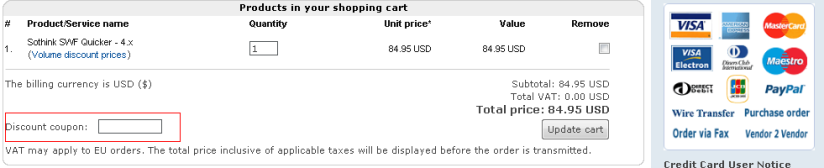
A5: Two payment methods we offered, Element 5 and PayPal support using your coupon information while submitting your order. They are for Element 5 users, after submit your order and click the Proceed to Checkout button, you can input your coupon information at following area when you fill in the table about your personal information:

If you're PayPal users, after choosing PayPal as your payment method, a Form like below will appear and you can input your coupon code information in the form if you have conpon code .If you don't have it, just leave blank.

Registration

Q1: How can I get the registration information after I purchase it?
Q2: How to register Sothink Products?
Q3: What’s the difference of Registered and Unregistered version of your software?
Q4: Is the registration key still valid for upgrade versions?
Q5: Can I use the same registration key for different computers?
Q6: Why I haven’t yet received my registration information and how to get it instantly?
Q7: How to get a registration key after purchase?


Q1: How can I get the registration key information I purchase it?
A1: Usually you will get the registration information within 24 hours via email after your payment is processed completely. If you haven’t received your key 24 hours after the payment is completed, please submit a ticket here to ask for the key. For more information about when you will receive the product after the payment, click here.

Q2: How to register Sothink Products?
A2:
For the registration steps of the following products please see below:
DHTML Software: Sothink DHTMLMenu, Sothink Tree Menu, etc.
Flash Software: Sothink SWF to Video Converter, Sothink SWF Quicker, Sothink SWF Easy, Sothink SWF Decompiler, Sothink Video Encoder for Adobe Flash,etc.
DVD Video Tool: Sothink iPod Video Converter, Sothink DVD to iPod Converter, Sothink DVD Ripper, Sothink DVD EZWorkshop, etc.
(Please download and install the latest version of the above software so as to be sure the registration code can work for you.)
Step 1: Download the software from our web site and install it.
Step 2: Launch the program and you will see such a dialog. (Take Sothink DHTMLMenu as an example)
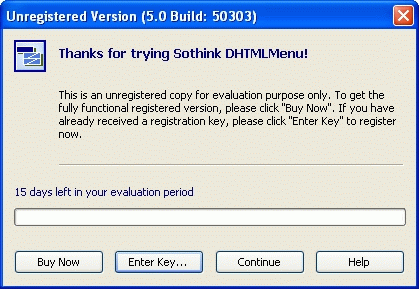
Step 3: Click "Buy Now" to go to our order page and fill in the order form. After your payment has been processed, you will get your "permanent key" instantly.

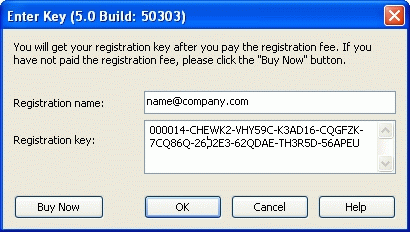
Step 4: Click "Enter Key", then input the registration name and registration key exactly.

Q3: What’s the difference of Registered and Unregistered version of your software?
A3: Generally speaking, there is no function difference between both versions. For some of the products such as Sothink SWF Decompiler, Sothink DHMLMenu and SWF to Video Converter etc., there do exists certain restrictions to the functions of the unregistered version; you can refer to the very product page to see the difference. The unregistered version is for evaluation purpose only. And it is limited to be used in 15 ~ 30 days since the installation of the program. When the evaluation period expires, you can not use the program any longer. To know more limitations of unregistered version for different software, please go to see different products’ webpage.

Q4: Is the registration key still valid for upgrade versions?
A4:  Yes, the key is still valid for MINOR upgrade versions. Normally, only for MAJOR upgrade do you need to pay to get a new valid key to unlock the latest version. Click here to find more of our Upgrade Policy.

Q5: Can I use the same registration key for different computers?
A5: The registration key is unique for each computer. If you own a single license of the software, you can not use the same registration key for different computers.


Q6: Why I haven’t yet received my registration information and how to get it instantly?
A6: The distribution of registration information is an automatic process and is not controlled manually. Here are the most common reasons for not receiving the key:

  • Your e-mail server is unavailable or reports errors while receiving the e-mail with the registration information. It is possible that this e-mail will be delivered later; usually the delivery is re-tried at 4 hours intervals, for a few days.
  • Your e-mail box is full, so the e-mail with the license key can't be delivered.
  • You are using some kind of spam protection, and the e-mail with the license key has been rejected for some reason. You can add support@sothink.com to your trusted e-mail addresses to solve this problem.

If you don't receive the e-mail with registration information within 24 hours, please try to use following methods to contact us and we will provide prompt support for you:

Online from 9:00 a.m. to 5:30 p.m.(GMT +8:00) in business days.

Q7: How to get a registration key after purchase?
A7: Please view the detailed instructions here >>

Customer Service

Q1: When will I receive my product and registration information?
Q2: What exactly will I receive if I purchase the Sothink software?
Q3: What advantages shall I always get as Sothink registered customers?
Q4: How can I contact your customer service?


Q1: When will I receive my product and registration information?
A1: After finishing submitting your orders online, you can start downloading the products from our Website immediately. Please go to its download page to obtain the zip file. Please note it is just evaluation version and you may need to use a registration key to unlock this version.
The registration information delivery depends on the payment option you choose.
Normally, if you pay by credit card / debit card, wire transfer during the online order process, or placed a purchase order through our sale service element5, you will receive the registration key information via a confirmation email within 24 hours of a business day.
One point must be mentioned is that if you pay in Euro or order the Bundles you might need to wait a little bit longer(within 36 hours of a business day or 72 hours at weekends) to get the key as those orders need to be processed manually.

Q2: What exactly will I receive if I purchase the Sothink software?
A2: Typically, you will receive a registration key in an e-mail, and a download link for the product you ordered.

Q3: What advantages shall I always get as Sothink registered customers?
A3: After becoming a member of the Sothink registered customers, you will get:

  • The software you paid for and a permanent registration key to unlock the software;
  • A perpetual license to use your creation work on as many web sites as you wish;
  • Free lifetime technical support either via e-mail or forum;
  • Free access to download software at anytime;
  • Free upgrades to all minor upgrade versions and preferential price to major upgrade versions;
  • Priority to take part in any activities or contest we hold and enjoy discounts we offered.

Q4: How can I contact your customer service?
A4: You can use three ways to contact us:

  • Submit a Ticket (Recommended):
  • Your submitted messages will be forwarded to the responsible department via our customer service unit and answered as quickly as possible.
  • Call us or leave a phone message: +86(27)67848991
  • Live Chat
  • Online from 9:00 a.m. to 5:30 p.m.(GMT +8:00) in business days.
    Currently we offer the support service in English and Chinese languages. For customers in other languages, please firstly help us understand your meanings in English or Chinese thus we could help you in deed.

    After Purchase

    Q1: What’s your upgrade policy?
    Q2: What should I do if I lost my product?
    Q3: Can I continue to use the program after I change my computers hardware?
    Q4: How can I get a written quote after purchase?


    Q1: What’s your upgrade policy?
    A1: Our upgrade policy is that all registered users can get a free upgrade for minor version update and share a favor price for major upgrade version release, which is normally the price different between two versions. To know the upgrade price for different software, please take reference to the description in different product’s upgrade page.

    Q2: What should I do if I lost my product?

    A2:Please submit your request though our ticket-submitting online system with the information as descriptive as much. We will confirm your order in database according to the information you submitted and then send you the application registration information to help you get back your software.

    Q3: Can I continue to use the program after I change my computers hardware?
    A3: If you change your computer's hardware after you have already entered the registration key, you can continue to use it.

    Q4: How can I get a written quote after purchase?
    A4: We would be happy to send you a quote by e-mail or fax. All products offered to you by Element 5 are sold on behalf of the software publisher at their terms and conditions. The contract of sale is concluded exclusively between you and the software publisher. The prices listed in the quote are not binding upon us and are also subject to exchange rate fluctuations.
    Please submit the following information for your quote:

    • The product name and, if known, the order number
    • The number of units you wish to order
    • The name to which the product should be licensed
    • Your company's billing address and, if applicable, a different delivery address
    • Contact name, phone number and fax number
    • The e-mail address where you would like the quote sent
    • The currency you would like to order in, and how you would like to pay for the order.
    We will list a unique quote number on our quote. If you have questions about the quote or wish to place an order, please mention this number so that we can process your request quickly.


    If you could not find the answer to your question here, please feel free to contact us via our ticket-submitting online system  with the information as descriptive as much, and our support team will give you a reply promptly.
    To better serve you, please pay attention to the note below:
    If you did not get prompt replies from our support team, here are the most common reasons:

    • Your e-mail server is unavailable or reports errors while receiving the e-mail. It is possible that this e-mail will be delivered later; usually the delivery is re-tried at 4 hours intervals, for a few days.
    • Your e-mail box is full, so our replies can't be delivered to you.
    • You are using some kind of spam protection, and our reply email has been rejected for some reason. You can add support@sothink.com to your trusted e-mail addresses to solve this problem.

    If all above solutions do not help, you can try other method to contact support team as soon as possible.


Sothink is a trademark of SouceTec Software Co.,LTD
Flash Decompiler, SWF Decompiler, Flash Animation Software, DHTML Menu, Tree Menu, JavaScript Web Scroller, Flash Album