Sothink SWF Easy - Rotate
Rotating an element with the Transform tool
- Choose Transform tool on the Toolbar;
- Select an element on the canvas. Now it'll be surrounded by a box with a center point and eight square handles;
- Move the cursor over one handle (
 ) to rotate the element around the center point .
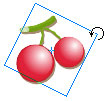
Tip : To rotate several elements at one time, press Shift key to add other elements to the selection.

Tutorial
SWF Easy Interface
Basic Skills
Quick Start
Effect
Use Resource
Use Component
Export
Publish
How to
- How can I select the elements, which are covered by others?
- How to edit a shape?
- How to edit a button?
- How to set an element as background?
- How to add links to elements?
- How to add links to scenes?
- How to add a preloader to my animation?
- How to add image to my artwork?
- Can I edit image in my artwork and how?
- How to find more resources (Shape, Button, Image, Sound, and etc.)?
- How to publish my animation?


 ) to rotate the element around the