

-
DHTML Menu V9.4
-
- About Sothink DHTML Menu
-
It is an easy and productive drop down menu builder to create SE friendly DHTML menu, JavaScript menu for web navigation without writing a single line of code. More than 80 templates and 30 preset styles let you create professional JavaScript menu in no time. The JavaScript menu appearance can be fully customized. Free integration enables you to add the menus to webpage using existing HTML editor.
Support Dreamweaver CS5!


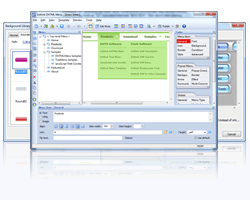
Special News - iPad Drop Down Menu

Ready or not, iPad is affecting the way we design websites. Now, the latest version of DHTML Menu can help you design iPad compatible drop down menu with ease. Check the iPad related resources below:
Quick Guide: How to make drop down menu for iPad website?
iPad Drop Down Menu Samples: Clean, Dark, Span, Bullet, List, Metallic
DHTML Menu Main Features
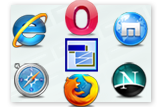
Perfect Compatibility
- Fully compatible with iPad website.
- Full cross-browser compatibility: supports the latest version of IE, Google Chrome, Firefox, Opera and Safari (Support Safari 5 on Win/Mac).
- This JavaScript menu builder can seamlessly integrate with Dreamweaver (CS5 supported), FrontPage, Expression Web and Adobe GoLive as add-ons.
- Supports making database driven JavaScript menu with ASP, PHP, JSP, ASP.NET, ColdFusion and more.
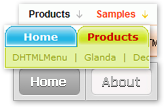
Diverse Functional Menu
- Easily creates functional JavaScript menu, such as tab menu, highlight menu, scrolling menu, cross-frame menu, multi-level/multi-column menu, custom menu, floating menu, right-to-left menu, keyboard navigation bar, etc.
- This DHTML menu builder is able to hide certain menu separators or items as needed.
- Position web menu anywhere fixedly or relatively on webpage.
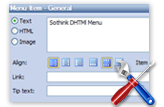
Flexible Customization
- Customizes DHTML menu properties, like font, icon, background, border, cursor, tool tip, surround, effects, alignment, transparency, size, etc.
- Support setting width at percent in iPad drop down menu to perform well for both landscape and portrait mode.
- Selects and edits images as icon, arrow, background and separator from Image Library and Background Library.
- Easily adjusts the color, tint & brightness to edit the image or choose corners and edges separately for surround.
High Usability
- This drop down menu builder offers over 80 templates, 30 styles and image library.
- Enables to save background color of preview window in authoring files, which make it convenient for editing next time.
- Publish wizard guides you to publish the drop down menu, JavaScript menu and DHTML menu to website step by step.
- Any HTML code can be used within the JavaScript menu item.
- Supports W3C Valid XHTML 1.0.



 DHTML Menu Templates
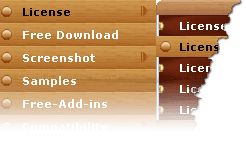 For saving time and energy, Sothink Menu Templates offers pre-designed drop down menu, JavaScript menu and DHTML menu for you! Get well-designed JavaScript menu, exquisite images and source file (including authoring and PSD file), and then include the drop down menu to webpage directly. Building drop down menu, JavaScript menu is so easy now.
Each series of JavaScript menu templates has various colors in the package.
Hurry up, pick up your favourite JavaScript menu templates to match with your site navigation bar.!
DHTML Menu Tutorials
Sothink Tutorial Center provides you free learning assistance for better using Sothink DHTML Menu to design professional drop down menu, JavaScript menu as web navigation bar.
DHTML Menu FAQ
Here, all the problems about using this drop down menu builder to make drop down menu, JavaScript menu will be settled down.
- How to upgrade Sothink DHTML Menu?
- Can the program insert DHTML menu into multiple pages and update them at one time?
- Did DHTML Menu support other web editors, such as, Macromedia Contribute, Windows SharePoint Services, Windows SharePoint Designer 2007 (Front Page) or Netscape Composer?
- What hosting platform does DHTML Menu support?
DHTML Menu Licenses
There are tree types of licenses provided for all.
All licenses allow you to create drop down menu, JavaScript menu for unlimited web sites.
- Designer License ($65): Personal, webmasters, web designers can order this license for personal use.
- Company License ($499.99): Company or team members can order this license for group use.
- World License ($1,498): Company or team members can order this license for commercial products and distribute software.
What's New in DHTML Menu?
Functions enhanced in the latest drop down menu builder:
- Upgrade Dreamweaver extension to V3.3.2 to support DW CS4 and CS5.
- Support Safari 5 on Windows & Mac OS X.
- 18 new built-in templates are available for designing JavaScript menu.
Samples: Board, List, Lilac, Anchor Chain, Modern - More version history information of DHTML menu builder >>

Testimonials DHTML Menu
Here lists the testimonials from warmhearted users of this drop down menu/JavaScript menu builder.
- The DHTML Menu has helped me spend less time trying to build drop down menus and produces beautiful, perfect, working menus.
- Appears to work very well so far. Fairly easy to learn for someone experienced in working with absolute and relative addresses, you will need to know basic HTML. Most comparable programs costs much more than this one.
- You have a REMARKABLE product ... I say again, this is an EXCELLENT program ... I have tried five or six others, and even purchased two of them, including OPENCUBE ... but I am switching to yours today.
Bundle Discount

Create eye-catching DHTML drop down menus and tree-view menus for web navigation without JavaScript programming.
 Buy for $99.00 SAVE $49.95
 Feature Comparison between DHTML Menu and Tree Menu >>
Reviews
- "This specialized program eases the process considerably with a no-nonsense interface that puts the necessary design and scripting elements at your fingertips."
- download.com
- "I can now create DHTML menus looking exactly how I want them, without having to wrestle with indecipherable javascript code."
- htmlbasix.com
Related Products

- Tree Menu
- Build professional tree menus in the easiest way!

- JavaScript Web Scroller
- Create attractive scrollers in minutes, without writing a single line of code!

- DHTML Menu (Lite Version)
- Build simple cross-browser drop down menus in seconds!

